Testing Throughout the SDLC
This lesson is available in multiple formats. The content is the same — feel free to choose the one that fits your current learning environment. You do not need to complete all.
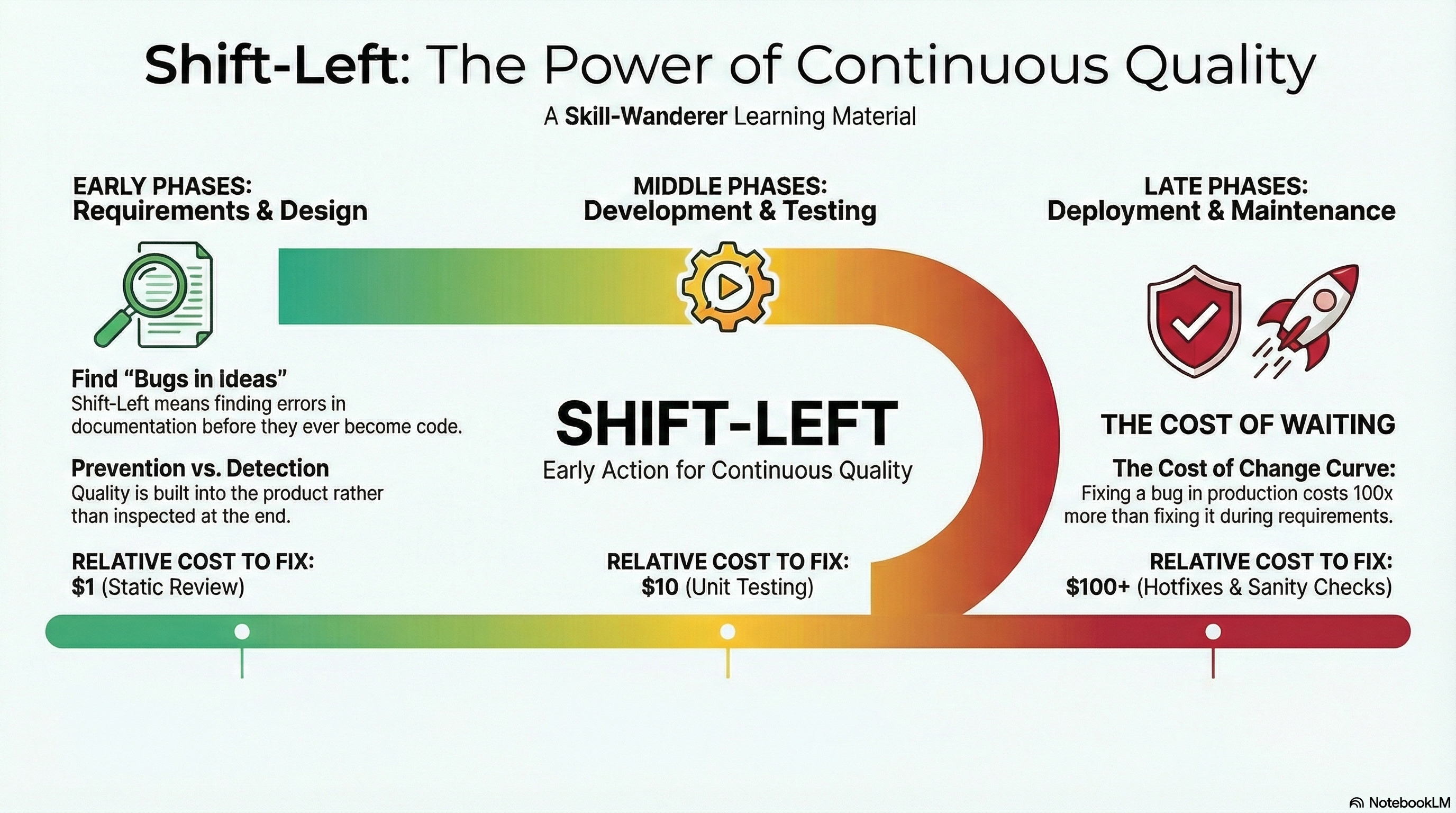
1. The "Golden Rule": Early Testing
Key Concept: Testing is an activity, not just a phase. If you wait until the code is finished to start testing, you are too late.
📉 The Cost of Fixing Defects
The later a bug is found, the more expensive it is to fix. This is known as the Cost of Change Curve.
Cheap to fix text on paper
Rewriting functions takes time
Hotfixes, lost trust, corruption
💡 Pro Tip: Your job as a tester isn't just to find bugs in the software; it's to find bugs in the ideas before they become software.
2. The Big Picture: SDLC & Testing Alignment
| SDLC Phase | Development Goal | Tester's Role (Validation) |
|---|---|---|
| Requirements | What are we building? | Static Testing: Do these requirements make sense? |
| Design | How will we build it? | Logical Review: Does this flow handle errors? |
| Development | Build the solution. | Preparation: Writing test cases & data. |
| Testing | Verify the solution. | Execution: Running tests & reporting defects. |
| Deployment | Release to users. | Sanity Check: Is the release safe? |
| Maintenance | Keep it running. | Regression: Did we break anything old? |
3. Phase 1: Requirements Analysis
The Goal: Ensure requirements are clear, complete, and testable.
🕵️♀️ Your Job (Static Testing)
You are reviewing documentation, not code. You are looking for Ambiguity.
- Review & Walkthrough: Read the Business Requirement Document (BRD).
- Identify Gaps: Ask "What happens if the user loses internet here?"
- Define Acceptance Criteria: What exactly determines "Success"?
📌 Real World Example
| ❌ Bad Requirement | ✅ Testable Requirement |
|---|---|
| "The page should load fast." | "The page must load in under 2 seconds with 4G connection." |
| "The password should be strong." | "The password must have 8+ characters, 1 number, and 1 symbol." |
4. Phase 2: Design
The Goal: Ensure the technical design supports the business needs.
🕵️♀️ Your Job
You are the voice of the user during architectural discussions.
- Design Review: Look at the wireframes or UI designs.
- Data Flow Analysis: If a user saves data here, does it show up there?
- Risk Analysis: Where is this feature most likely to break?
🧠 Critical Thinking: If the design shows a "Upload Photo" button, ask: "What is the maximum file size? What format? What happens if the file is corrupt?"
5. Phase 3: Development (Coding)
The Goal: Build the software.
🕵️♀️ Your Job (Preparation)
While developers are writing code, you are NOT idle. This is your busiest preparation time.
- Write Test Cases: Create the step-by-step instructions you will run later.
- Prepare Test Data: Create dummy users, fake credit card numbers, or sample files.
- Review Unit Tests: (Advanced) Check if developers have covered the basics.
6. Phase 4: The Testing Phase
The Goal: Validate the system end-to-end.
🕵️♀️ Your Job (Execution)
This is "Dynamic Testing"—running the software.
- Smoke Testing: The "Health Check." Does the app launch? If no, reject the build.
- Functional Testing: Testing specific features against requirements.
- Regression Testing: Re-testing unchanged parts to ensure new code didn't break old code.
- Bug Reporting: Logging clear, reproducible defects.
7. Phase 5: Deployment
Goal: Release safely.
- Sanity Testing: A quick check in Staging/Production.
- Release Verification: Confirm versioning.
⚠️ Warning: Never do "Destructive Testing" (like deleting data) in Production!
8. Phase 6: Maintenance
Goal: Stability & Evolution.
- Regression Testing: Check patches.
- Incident Analysis: Reproduce user bugs.
🔁 Summary Concept: Shift-Left Testing
Shift-Left simply means moving testing activities to the left side of the timeline (earlier in the SDLC).
Requirements ➔ Design ➔ Code ➔ TEST (Too Late!)
✅ TEST Req ➔ ✅ TEST Design ➔ ✅ TEST Code ➔ Verify
Benefits:
- Faster Feedback: Devs know about bugs immediately.
- Lower Cost: Preventing a bug is cheaper than fixing it.
- Better Quality: Quality is built in, not inspected in.
📝 Quick Quiz
(Self-reflection: Try to answer these before moving to the next module)
- Which phase is the most expensive to fix a bug in?
- What is the manual tester doing during the Development Phase?
- What is the difference between Smoke Testing and Regression Testing?