HTTP Methods (GET, POST, PUT, DELETE)
This lesson is available in multiple formats. The content is the same - choose the one that fits your learning style and current environment. You do not need to complete all formats.
📖 Reading Version
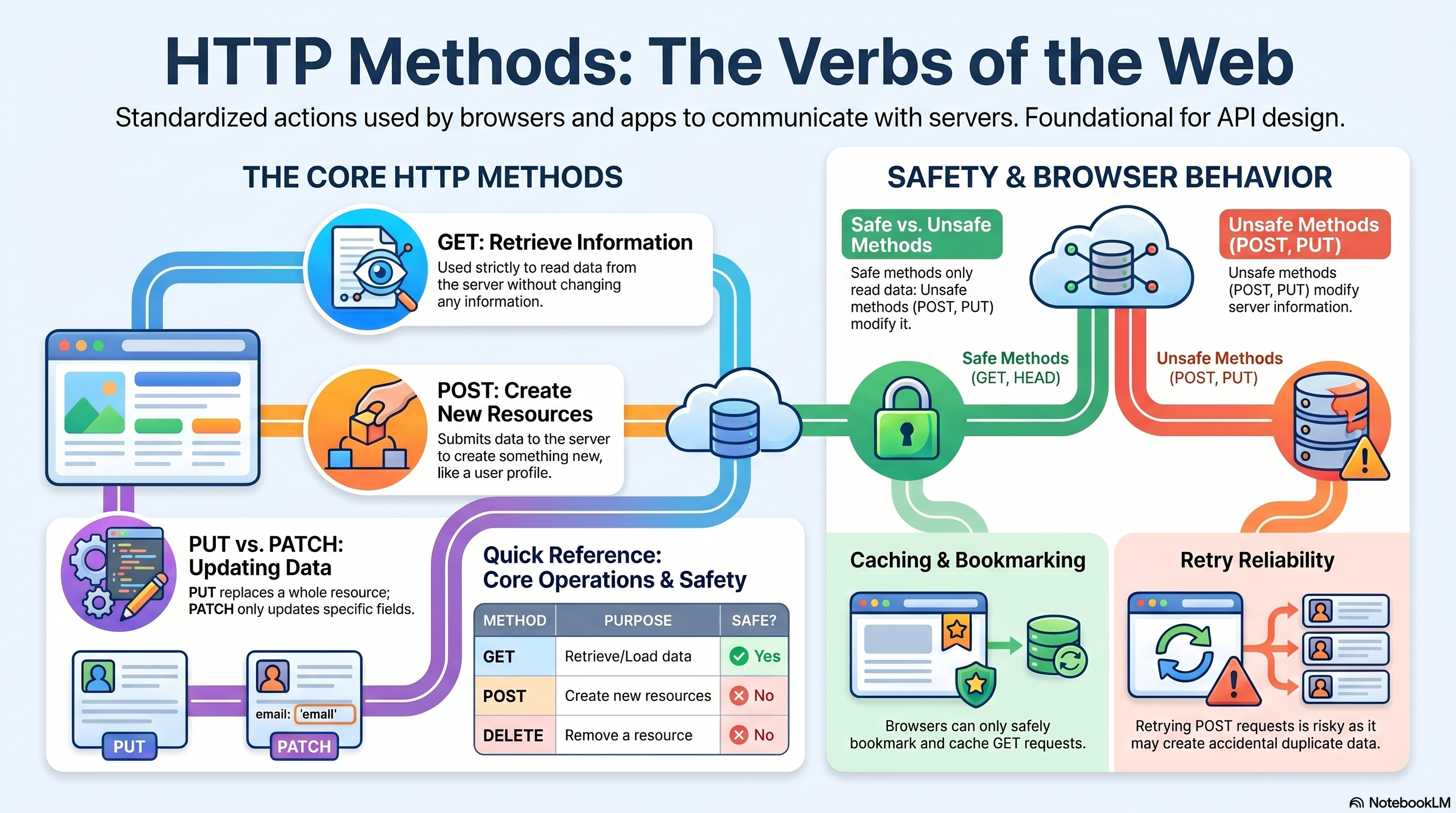
HTTP Methods
HTTP methods are like actions you ask a server to do.
Every time you visit a website, submit a form, or use an app, your browser or app sends a request to a server using one of these methods.
They tell the server: “Give me this page,” “Save this data,” “Update that,” or “Delete that.”
Why Do We Need HTTP Methods?
Without clear actions, communication between your browser/app and a server would be confusing and unpredictable.
HTTP methods give a shared set of rules so everyone knows what’s going on.
They handle four main data operations:
- Getting information (reading)
- Creating new things
- Updating existing things
- Deleting things
The Main Idea: Each Method Has a Meaning
Every method says what you want to happen.
| Method | Simple meaning |
|---|---|
| GET | “Show me this information” |
| POST | “Create something new with this data” |
| PUT | “Replace the whole thing with my new data” |
| PATCH | “Only update the parts I’m sending” |
| DELETE | “Remove this” |
Using the right method makes your APIs and websites easier to understand and work with.
Safe vs. Unsafe Methods
Safe Methods
Safe methods don’t change anything on the server. They’re like reading a book – you only look at the information.
Examples: GET, HEAD, OPTIONS
Unsafe Methods
Unsafe methods may change data on the server. They’re like writing in a notebook.
Examples: POST, PUT, PATCH, DELETE
Quick Overview of All Common Methods
| Method | Purpose | Safe? |
|---|---|---|
| GET | Retrieve data | Yes |
| POST | Create new resources | No |
| PUT | Replace whole resource | No |
| PATCH | Update parts of a resource | No |
| DELETE | Remove a resource | No |
| HEAD | Get only headers (no body) | Yes |
| OPTIONS | Find out what methods are allowed | Yes |
Which Method Should I Use?
| What you want to do | Use this method |
|---|---|
| Fetch data / load a page | GET |
| Create a new resource (signup, upload) | POST |
| Replace a whole resource | PUT |
| Update only some fields | PATCH |
| Delete a resource | DELETE |
| Check file info without downloading it | HEAD |
| Ask what operations a URL supports | OPTIONS |
GET – Ask for Information
GET is used whenever you want to read data from the server.
It should never change anything on the server.
Example:
GET /products/10Response (the product info):
{
  "id": 10,
  "name": "Laptop"
}
GET is:
- Safe (doesn’t change server state)
- Cacheable (browser can save a copy)
- Bookmarkable (you can save the link)
- Linkable (you can share it)
Why GET Is Safe
GET is considered safe because it is intended only for retrieving information.
A client can call the same GET request many times without creating, modifying, or deleting data on the server.
Example:
GET /users/10This only reads the user data.
It does not:
- Create a new user
- Update existing data
- Remove anything
Because of this behavior:
- Browsers can safely preload GET requests
- Search engines can crawl GET URLs
- Users can refresh the page without accidental data modification
Common Query Parameters
GET /products?page=1&limit=20
GET /search?q=laptop
Used for:
- Pagination
- Filtering
- Sorting
- Searching
POST – Send Data to Create Something
POST is for submitting data and usually creating a new resource.
Example:
POST /users
Content-Type: application/json
Body:
{
  "name": "John Doe"
}
POST is typically used for:
- Form submissions (login, signup)
- Creating a new user, order, post
- File uploads
- Any action where you’re adding something new
Why POST Is Not Safe
POST is not safe because it changes server data or triggers server-side actions.
Example:
POST /ordersThis may:
- Create a new order
- Insert data into a database
- Trigger payment processing
- Send notifications
Calling the same POST request repeatedly may create duplicate data or repeated actions.
PUT – Replace the Whole Thing
PUT replaces an entire resource with the data you send.
You must send the complete updated version.
Example:
PUT /users/10Body:
{
  "name": "John",
  "email": "john@example.com"
}
If you only send the email, the name may be erased because PUT expects the full resource.
Why PUT Is Not Safe
PUT is not safe because it modifies existing data on the server.
Example:
PUT /users/10This changes the stored resource by replacing its content with the new version provided by the client.
Even though repeated PUT requests may produce the same final state, the request still performs a modification operation.
PATCH – Update Only Certain Fields
PATCH makes a partial update. You only send the fields you want to change.
Example:
PATCH /users/10Body:
{
  "email": "new@example.com"
}
Only the email is changed; the rest of the user data stays as it was.
Why PATCH Is Not Safe
PATCH is not safe because it changes part of an existing resource.
Example:
PATCH /users/10This modifies selected fields in the stored data.
Even small updates still change server state, which makes PATCH unsafe.
DELETE – Remove Something
DELETE removes a resource permanently.
Example:
DELETE /posts/15Why DELETE Is Not Safe
DELETE is not safe because it removes data from the server.
Example:
DELETE /posts/15This may:
- Remove database records
- Delete files
- Remove relationships between resources
Because server data changes after the request, DELETE is classified as unsafe.
HEAD – Get Only the Headers
HEAD works exactly like GET but does not return the body (the actual content).
It only sends back the headers (information about the resource).
Useful for:
- Checking file size before downloading
- Verifying if a page has changed (cache validation)
- Seeing metadata
Example:
HEAD /video.mp4Why HEAD Is Safe
HEAD is considered safe because it only retrieves metadata about a resource and does not modify server data.
Example:
HEAD /video.mp4The server only returns headers such as:
- Content-Length
- Content-Type
- Last-Modified
No resource is created, updated, or deleted.
OPTIONS – Ask What’s Allowed
OPTIONS asks the server: “What methods can I use on this URL?”
Example:
OPTIONS /usersResponse header:
Allow: GET, POST, PUT, DELETECommonly used for:
- Discovering what operations an API supports
- Browser preflight requests (CORS checks)
Why OPTIONS Is Safe
OPTIONS is considered safe because it only asks the server about supported communication methods.
Example:
OPTIONS /usersThe server responds with information such as:
- Allowed HTTP methods
- CORS permissions
- Communication capabilities
It does not create, update, or remove data on the server.
How Browsers Behave with Each Method
| Method | Can I bookmark it? | Does the browser cache it? |
|---|---|---|
| GET | ✅ Yes | Usually yes |
| POST | ❌ No | Usually no |
| PUT | ❌ No | Usually no |
| PATCH | ❌ No | Usually no |
| DELETE | ❌ No | Usually no |
| HEAD | ❌ No | Yes (headers) |
| OPTIONS | ❌ No | Usually no |
HTML Forms – Which Methods Can They Use?
Standard HTML forms only support GET and POST.
Example:
<form method="POST" action="/login">To use PUT, PATCH or DELETE, you usually need JavaScript or a special API tool.
Do I Need to Send a Request Body?
| Method | Body included? |
|---|---|
| GET | Usually no |
| POST | Yes |
| PUT | Yes |
| PATCH | Yes |
| DELETE | Sometimes |
| HEAD | No |
| OPTIONS | Usually no |
Retry Behaviour – Is It Safe to Try Again?
| Method | Safe to retry? | Explanation |
|---|---|---|
| GET | Usually safe | No changes happen |
| POST | Risky | Might create duplicates (e.g., two orders) |
| PUT | Usually safe | Same data → same final state |
| PATCH | Depends | Some updates are safe, some are not |
| DELETE | Usually safe | Deleting again does nothing extra |
| HEAD | Safe | No body or changes |
| OPTIONS | Safe | Just a question, no changes |
Common Mistakes (and How to Fix Them)
❌ Using GET to delete something
GET /delete-user/10
Why it’s wrong: GET should never change server state. A browser might accidentally trigger it again.
✅ Correct:
DELETE /users/10
❌ Using POST just to fetch data
POST /get-products
Why it’s wrong: POST is for creating/submitting, not for reading. It’s not cacheable and breaks expectations.
✅ Correct:
GET /products
Real-Life Browser Examples
- Opening a webpage:
GET /home - Submitting a login form:
POST /login - Updating your profile (with JavaScript):
PATCH /profile - Deleting a comment:
DELETE /comments/10
Final Summary
HTTP methods are the basic language that browsers, apps, and servers use to talk to each other.
Each method has a specific job and expected behaviour.
Learning them properly helps you:
- Build predictable and easy-to-use APIs
- Use the right action for the right task
- Avoid confusing or broken web applications
Think of them as the verbs of the web – once you know what each one does, writing and understanding web requests becomes much simpler.