Introduction to REST API
This lesson is available in multiple formats. The content is the same - choose the one that fits your learning style and current environment. You do not need to complete all formats.
📖 Reading Version
What is an API?
An API (Application Programming Interface) is a set of rules that allows two software applications to communicate with each other. Think of it as a waiter in a restaurant: you (the client) place an order, the waiter (the API) carries your request to the kitchen (the server), and brings back your food (the response).
APIs are everywhere in modern software:
- A weather app on your phone fetches data from a weather service API.
- A payment button on a website calls a payment provider's API.
- A mobile app displays your feed by calling a social platform's API.
In every case the pattern is the same: the client sends a request, the server processes it, and the server sends back a response. REST is the set of rules that makes this exchange predictable.
What is REST?
REST (Representational State Transfer) is an architectural style for designing networked APIs. It was introduced by Roy Fielding in his 2000 doctoral dissertation. REST defines a set of constraints that, when followed, produce a consistent, scalable, and easy-to-understand API.
A REST API communicates over HTTP — the same protocol your browser uses to load web pages. This makes REST APIs accessible from any platform or language that can send HTTP requests.
Core Concepts
Resource
In REST, everything is a resource. A resource is any piece of data or object you want to expose: a user, a product, an order, a blog post. Each resource is identified by a unique URL called a URI (Uniform Resource Identifier).
/api/users— the collection of all users/api/users/42— a specific user with ID 42/api/products/99— a specific product with ID 99
HTTP Methods
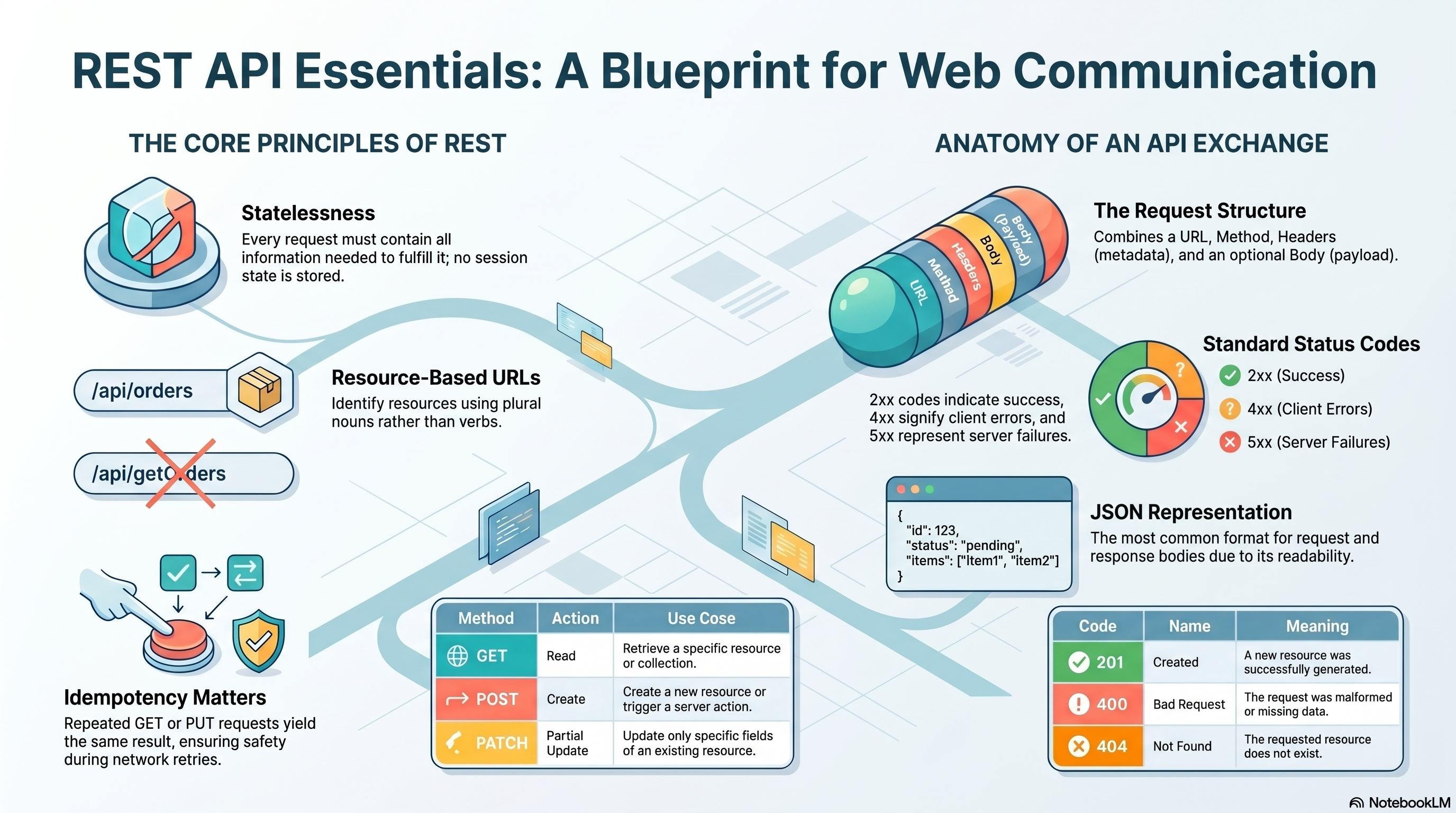
REST uses standard HTTP methods to define what action to perform on a resource:
| Method | Action | Example |
|---|---|---|
GET | Read / retrieve a resource | GET /api/users |
POST | Create a new resource | POST /api/users |
PUT | Replace / update a resource fully | PUT /api/users/42 |
DELETE | Remove a resource | DELETE /api/users/42 |
PATCH | Partially update a resource | PATCH /api/users/42 |
HEAD | Same as GET but returns headers only (no body) | HEAD /api/users |
OPTIONS | Describe communication options for a resource | OPTIONS /api/users |
The combination of a method + URI tells the server exactly what you want to do and with which resource.
PATCH vs PUT: Use PUT when replacing the entire resource; use PATCH when updating only specific fields. HEAD is useful to check if a resource exists or to read metadata without downloading the body. OPTIONS is used by browsers for CORS preflight checks.
In practice, the HTTP method should match your intent before anyone reads the request body. A well-designed API becomes easier to understand because the method already signals whether the client is reading, creating, replacing, editing, deleting, or inspecting a resource.
GETis commonly used to list collections or fetch one existing record.POSTis commonly used to create something new or trigger a server-side action.PUTfits cases where the client sends a complete new version of a resource.PATCHfits partial edits such as changing only a status, email, or display name.DELETEremoves a resource or marks it as deleted.HEADlets clients check existence or metadata without downloading the response body.OPTIONStells the client which methods and cross-origin rules are available for that endpoint.
Idempotency
Idempotency means that making the same request multiple times produces the same result as making it once. This matters when retrying failed requests.
GET— safe and idempotent: reads data, never changes server state.PUT— idempotent: replacing a resource with the same data twice yields the same outcome.POST— not idempotent: each call creates a new resource, so repeating it creates duplicates.
Safe methods (GET, HEAD) never change server state. Unsafe methods (POST, PUT, PATCH, DELETE) may modify data.
Stateless
REST APIs are stateless: each request from the client must contain all the information the server needs to fulfill it. The server does not store any session state between requests. Every request stands on its own.
This makes REST APIs easier to scale — any server in a cluster can handle any request because there is no shared session memory to maintain.
Request and Response Anatomy
Before looking at more endpoints, it helps to understand the full shape of an HTTP exchange. The client sends a request to a server, and the server answers with a response. If you can read those two messages clearly, you can debug most API problems much faster.
Request Structure
A request tells the server what resource the client wants and what action to perform. For example, POST https://api.example.com/api/users?role=student means the client is sending data to create a user, and the query string adds extra instruction to the request.
- URL — Identifies the target resource, such as
https://api.example.com/api/users/42. - Path Parameters — Identify a specific resource inside the path, such as
/api/users/42/orders/3. - Query Parameters — Add filters or options after
?, such as/api/users?role=admin&page=2. - Headers — Carry metadata about the request. Common examples are
Content-Type: application/jsonto describe the body format andAuthorization: Bearer <token>to prove identity. - Body — Sends data to the server, usually with
POST,PUT, orPATCH. A body might contain JSON with a user's name, email, and role.
URL
| Aspect | Explanation | Example | System Insight |
|---|---|---|---|
| What | The URL is the full request address. It combines the protocol, domain, path, and optional query string into one location that the client calls. | https://api.example.com/api/users/42?include=profile | The URL is the primary routing key in REST architecture. |
| Why | It tells the system where the request should go. In https://api.example.com/api/users/42, https is the secure protocol, api.example.com is the domain, /api/users is the resource path, and 42 is the specific resource ID. | https://api.example.com/api/users/42 | Each URL part narrows the request from network location to one concrete resource target. |
| When | Every HTTP request uses a URL, whether the client is reading, creating, updating, or deleting data. The same URL can support multiple actions when the HTTP method changes. | GET /api/users/42 versus PATCH /api/users/42 | The URL keeps identity stable while the method changes intent. |
| Where | The URL appears in the request line and is read first by load balancers, gateways, routers, and the application server before business logic runs. | GET /api/users/42 HTTP/1.1 | Routing systems inspect the URL early to decide which handler or controller should receive the request. |
| Who | The client constructs the URL from API documentation, and the server routing layer binds it to a matching endpoint. | A frontend calls /api/users/42, and the backend maps it to a user detail controller. | The URL forms the contract between client navigation, API gateways, and backend routing rules. |
| How | A well-designed URL uses a predictable HTTPS scheme, a stable domain, noun-based paths, and clear resource IDs. It then works together with the HTTP method to express both destination and action. | DELETE https://api.example.com/api/users/42 | Predictable URLs improve routing, observability, caching, and debugging across the system. |
Path Parameters
| Aspect | Explanation | Example | System Insight |
|---|---|---|---|
| What | Path parameters are variable values placed inside the URL path to identify one specific resource or one nested resource under another. | /api/users/42/orders/3 | Path parameters define resource identity, not filtering. |
| Why | They let the API point to exact records such as one user, one order, or one child resource inside a hierarchy. | /api/users/42 and /api/users/42/orders/3 | Path parameters express identity and ownership relationships directly in the route. |
| When | Use them when the client needs a specific record or a nested resource, such as one order that belongs to one user. | GET /api/users/42/orders/3 | They are used when route matching must bind the request to a concrete resource key. |
| Where | They appear inside the path segments of the URL, usually after a collection name such as /users/:id or /orders/:orderId. | /api/users/42/orders/3 | Routers extract path parameters from the URL before the controller runs. |
| Who | The client sends the parameter values, and the backend router or controller binds them to variables such as userId and orderId. | A server maps /api/users/42 to getUser(userId = 42). | Route binding turns path segments into controller inputs for authorization and data lookup. |
| How | The routing layer matches the route pattern, extracts the parameter values, and passes them to application code, which then loads or updates the matching resource. | /api/users/:userId/orders/:orderId | Path parameters anchor the request to identity, while query parameters only shape the returned view. |
Query Parameters
| Aspect | Explanation | Example | System Insight |
|---|---|---|---|
| What | Query parameters are key-value pairs added after ? to change how the server returns a result without changing the core path. | /api/users?role=admin&page=2&sort=name | Query params shape the result set without changing identity. |
| Why | They let the client filter, paginate, sort, search, or toggle optional behaviors without creating a new endpoint for each variation. | ?role=admin filters, ?page=2 paginates, ?sort=name sorts | They describe a view of the resource collection rather than a new resource. |
| When | Use them when the client needs optional controls or a narrower result set. Some APIs also document specific query parameters as required for a certain report or search operation. | /api/reports?from=2026-01-01&to=2026-01-31 | Optional and required query parameters are both part of the endpoint contract. |
| Where | They appear after ? at the end of the URL, and multiple values are joined with &. | ?page=2&limit=20 | The backend usually receives them as strings first, then parses and converts them into typed values. |
| Who | The client chooses the query parameters, and the backend controller or service validates them before turning them into filters, limits, offsets, or sort rules. | A frontend sends page=2, and the server turns it into pagination logic. | Backend parsing decides whether a query value is valid, defaulted, ignored, or rejected. |
| How | The server reads each parameter, validates allowed values, applies defaults when needed, then maps the result to filtering, pagination, and sorting behavior. | /api/users?role=admin&page=2&sort=name | Query parameters shape the returned dataset while the path still points to the same resource collection. |
Headers
| Aspect | Explanation | Example | System Insight |
|---|---|---|---|
| What | Headers are key-value lines that describe how the request should be processed. Common ones include Content-Type, Accept, Authorization, and Cache-Control. | Content-Type: application/json | Headers act as the control plane for request and response. |
| Why | They keep metadata separate from the body. This tells the server what format was sent, what format is preferred in return, whether a token is present, and how caching should behave. | Accept: application/json | Headers carry negotiation, identity, and caching rules without changing the resource path. |
| When | Use headers when the request needs content negotiation, authentication, cache instructions, compression hints, or other transport-level rules. | Authorization: Bearer <token> on a protected endpoint | The same endpoint can behave differently depending on header values. |
| Where | Headers sit between the request line and the body, so proxies, gateways, and the application can inspect them before reading the payload. | Cache-Control: no-cache | Infrastructure layers often enforce auth, caching, and policy checks from headers first. |
| Who | Clients send request headers, servers validate them, and responses also send headers back. In token-based flows, the client adds a bearer token and the server verifies it before allowing access. | Authorization: Bearer eyJ... | Headers coordinate client, gateway, cache, and server behavior across the full request path. |
| How | Content-Type tells the server what the body format is, Accept tells the server what response format the client wants, Authorization carries credentials, and Cache-Control influences reuse rules. | Content-Type: application/jsonAccept: application/jsonCache-Control: no-cache | Headers enable negotiation and policy enforcement before the application trusts the payload. |
Body
| Aspect | Explanation | Example | System Insight |
|---|---|---|---|
| What | The body is the optional payload that carries the request data itself. In REST APIs, it often contains the fields used to create or update a resource. | { "name": "Ava", "email": "ava@example.com", "role": "student" } | The body carries state mutation data. |
| Why | It keeps business data out of the URL and lets the client send structured input such as objects, arrays, or files. | POST /api/users with user details in JSON | The body is the payload, while the HTTP request is the transport envelope around it. |
| When | It is common with POST, PUT, and PATCH, because those methods usually create or change server-side state. Many GET requests do not use a body at all. | PATCH /api/users/42 with { "role": "admin" } | Body usage follows method semantics more than URL shape. |
| Where | The body comes after the headers, and the server reads it based on the declared Content-Type. The transport layer moves raw bytes, then the application layer parses them into usable data. | Content-Type: application/json followed by JSON content | Parsing turns network bytes into application objects that business logic can validate. |
| Who | The client sends the body, and the server is responsible for validating it against schema expectations, required fields, types, and business rules before saving or applying changes. | A server rejects a request if email is missing or badly formatted. | Validation layers convert untrusted input into trusted application data. |
| How | The body should follow the API schema, stay focused on the requested change, and remain reasonably sized. Large uploads often use multipart/form-data or streaming instead of one large JSON payload. | multipart/form-data for an image upload | Payload size affects latency, parsing cost, memory use, request limits, and overall system performance. |
Not every request uses every part. A simple GET /api/users may use only the URL, while an authenticated PATCH /api/users/42?notify=true request may combine the URL, path parameters, query parameters, headers, and body together.
Response Structure
A response tells the client what happened after the server processed the request. It usually contains a status code, headers, and sometimes a body.
- Status Code — Shows the outcome, such as
200 OKfor success or404 Not Foundif the resource does not exist. - Headers — Describe the response, for example
Content-Type: application/jsonso the client knows how to parse the returned data. - Body — Contains the returned data or an error message. Successful responses often include resource data, while failed responses often include details about what went wrong.
Reading the request and response together gives you the full story: what the client asked for, how the server interpreted it, and what came back.
Example Endpoint
Let's look at a real-world example. To retrieve a list of users, a client sends:
GET /api/users
Breaking this down:
GET— the HTTP method: we want to read data, not modify it./api/users— the resource URI: the collection of all users.
URL Design Patterns
Well-designed REST URLs are predictable and consistent. Follow these conventions:
- Use nouns, not verbs —
/api/users, not/api/getUsers. - Use plural names for collections —
/api/orders, not/api/order. - Nest resources to show relationships —
/api/users/42/ordersfor orders belonging to user 42.
Path vs Query
There are two ways to pass data in a URL, each with a clear purpose:
- Path parameter — identifies a specific resource. It is part of the URL path:
/api/users/42(42 is the path parameter). - Query parameter — filters or modifies the result. It is appended after
?:/api/users?role=admin&page=2.
HTTP Status Codes
Status codes tell you whether a request succeeded or failed, and why. They are grouped by their first digit:
| Code | Name | Meaning |
|---|---|---|
200 | OK | Request succeeded. Data is returned in the response body. |
201 | Created | A new resource was successfully created (common after POST). |
400 | Bad Request | The request was malformed or missing required data. |
404 | Not Found | The requested resource does not exist. |
500 | Internal Server Error | The server encountered an unexpected error. |
You will study the full range of status codes — including 401 Unauthorized, 403 Forbidden, and 429 Too Many Requests — in a dedicated lesson later in this course.
Error Example
When a request fails, the server returns an appropriate status code and a JSON body explaining what went wrong:
HTTP/1.1 404 Not Found

{
  "error": "User not found",
  "code": 404
}
Always read both the status code and the response body — the body often contains the specific reason for failure.
Representation Formats
The body of a request or response is called a representation. JSON is the most common format in modern REST APIs, but it is not the only one you will encounter.
| Format | What | When to Use | Example | System Insight |
|---|---|---|---|---|
JSON | Structured key-value data using objects and arrays. | Default for most REST request and response bodies. | { "name": "Ava", "role": "student" } | JSON is the reference data model for modern API payloads. |
form-data | Multipart payload made of separate named parts. | File uploads with text fields such as profile forms. | avatar=[file], name=Ava | multipart/form-data separates binary files from metadata. |
x-www-form-urlencoded | Compact key-value body encoded like a query string. | Simple HTML forms and legacy endpoints. | name=Ava&role=student | Highly compatible, but weak for nested data and files. |
raw | Plain text or custom payload sent exactly as written. | Webhooks, signatures, or simple text bodies. | Hello from client | The application must interpret the payload itself. |
binary | Raw file bytes without text encoding. | Streaming images, videos, archives, or documents. | application/octet-stream | Efficient for files, but not human-readable. |
GraphQL | Query-driven request payload, usually sent as JSON. | Flexible data fetching when clients choose fields. | { "query": "{ user(id: 42) { name } }" } | GraphQL shifts responsibility from many endpoints to schema and query structure. |
JavaScript | Executable script or runtime configuration snippet. | Rare browser-specific integrations or legacy script delivery. | window.appConfig = { apiBase: "/api" } | Powerful in browsers, but carries stronger security constraints. |
HTML | Rendered markup for pages or fragments. | Server-rendered content, widgets, or partial page updates. | <div>Profile</div> | HTML returns presentation, not only data. |
XML | Hierarchical tag-based structured format. | Legacy systems, enterprise integrations, and feeds. | <user id="42"><name>Ava</name></user> | Verbose, but strong for schema-driven compatibility. |
The format is usually declared with the Content-Type header so both client and server know how to handle the data correctly.
JSON
| Aspect | Explanation | Example | System Insight |
|---|---|---|---|
| What | JSON is a text-based structured format that represents data as key-value objects and arrays. | { "id": 42, "name": "Alice" } | JSON is the default representation model for most REST APIs. |
| Why | It is readable, language-agnostic, and easy for clients and servers to exchange. | { "role": "student", "active": true } | Its cross-language compatibility lowers integration cost. |
| When | Use it for most structured business data in request and response bodies. | POST /api/users with JSON payload | JSON works best for records, collections, and configuration-like data. |
| Where | It appears in the message body with Content-Type: application/json. | Content-Type: application/json | Middleware often parses JSON before controllers run. |
| Who | Clients serialize native objects into JSON, and servers parse and validate them against expected schemas. | A frontend sends a user object, and the backend validates its fields. | Schema validation sits between raw JSON parsing and business logic. |
| How | The payload is sent as text, parsed into native objects, and then processed. The trade-off is that JSON is not efficient for raw binary files. | [{ "id": 1 }, { "id": 2 }] | JSON is portable and debuggable, but files usually need another format. |
form-data
| Aspect | Explanation | Example | System Insight |
|---|---|---|---|
| What | form-data is a multipart body made of separate named parts, where each part can contain text or a file. | avatar=[file], name=Ava | multipart/form-data enables file transfer with metadata separation. |
| Why | It lets the client upload files and normal fields together in one request. | Profile image plus displayName | Files and form fields can travel in one transport envelope. |
| When | Use it for image uploads, document submissions, and other file-oriented forms. | POST /api/profile/avatar | It is the standard choice when binary content and text must be combined. |
| Where | It appears in the request body with a boundary-aware header such as Content-Type: multipart/form-data. | Content-Type: multipart/form-data; boundary=--- | The boundary tells the server where each part begins and ends. |
| Who | Browsers and clients build the multipart body, and backend parsers split it into files and text fields. | A backend extracts req.file and req.body.name. | Specialized upload middleware usually handles multipart parsing. |
| How | Each part carries its own headers and content. The trade-off is more parsing complexity than JSON, but broader support for uploads. | One part for a JPEG, one part for a user ID | Multipart uploads are flexible, but heavier than plain JSON requests. |
x-www-form-urlencoded
| Aspect | Explanation | Example | System Insight |
|---|---|---|---|
| What | This format encodes the body as simple key-value pairs joined by &. | email=ava%40example.com&role=student | It reuses the same encoding style seen in query strings. |
| Why | It is compact and widely supported by browsers, forms, and older servers. | Login or token exchange forms | Compatibility is its main strength. |
| When | Use it for small form submissions, search forms, or legacy endpoints that expect simple fields. | POST /oauth/token | It works well when the payload is flat and text-only. |
| Where | It appears in the request body with Content-Type: application/x-www-form-urlencoded. | Content-Type: application/x-www-form-urlencoded | Servers decode it into field dictionaries before validation. |
| Who | Browsers and HTTP clients encode the data, and server parsers decode it back into field values. | A backend reads email and password from the body. | The server still validates types and required fields after decoding. |
| How | Values are percent-encoded as text. The trade-off is weak support for nested objects and no native support for file uploads. | grant_type=client_credentials&scope=read | It is simple and portable, but not ideal for complex payloads. |
raw
| Aspect | Explanation | Example | System Insight |
|---|---|---|---|
| What | raw means the body is sent as plain text or custom bytes without being wrapped in a higher-level data structure. | Hello from client | The application, not the format, defines the meaning of the payload. |
| Why | It preserves the exact payload, which is useful for plain text, signed messages, or custom protocols. | Webhook signature verification | Exact byte preservation matters in security-sensitive integrations. |
| When | Use it when a service expects plain text, exact raw bytes, or a custom media type instead of JSON. | text/plain note submission | It fits special cases more than mainstream API payloads. |
| Where | It appears in the body with a media type such as text/plain or another custom Content-Type. | Content-Type: text/plain | The media type becomes the main hint for backend interpretation. |
| Who | The client sends the raw bytes, and the backend reads them without automatic JSON or form parsing. | A server reads the request body as one text blob. | Manual parsing gives flexibility, but increases application responsibility. |
| How | The server processes the body exactly as received. The trade-off is flexibility versus the loss of shared structure and automatic validation helpers. | Custom signed payload body | Raw bodies are powerful, but they push parsing and validation logic into the application layer. |
binary
| Aspect | Explanation | Example | System Insight |
|---|---|---|---|
| What | binary sends raw file bytes instead of a text-based structure. | application/octet-stream | Binary prioritizes transport efficiency over readability. |
| Why | It avoids converting files into text, which is more efficient for large media or archive content. | Uploading a ZIP archive | Streaming bytes reduces unnecessary encoding overhead. |
| When | Use it for file uploads, downloads, media streaming, and storage pipelines. | PUT /api/files/report.pdf | Binary is best when the payload itself is the file. |
| Where | It appears directly in the body with a binary media type such as application/octet-stream or a specific file type. | Content-Type: application/pdf | Metadata often moves to headers or path parameters when the body is pure bytes. |
| Who | Upload clients stream the bytes, and storage or media services receive them through stream-aware handlers. | A server streams the upload into object storage. | Binary handling often depends on streaming rather than full in-memory parsing. |
| How | The transport sends bytes exactly as they are. The trade-off is strong performance for files, but weak human readability and less self-describing structure. | Video upload stream | Binary formats usually need external metadata to describe the content safely. |
GraphQL
| Aspect | Explanation | Example | System Insight |
|---|---|---|---|
| What | GraphQL requests carry a query and optional variables, usually inside a JSON payload over HTTP. | { "query": "{ user(id: 42) { name } }" } | GraphQL changes the payload contract from endpoint-driven to query-driven. |
| Why | It lets the client request only the fields it needs instead of accepting a fixed response shape from many separate endpoints. | Ask only for name and email | Field selection moves more control to the client. |
| When | Use it when clients need flexible data fetching across related resources and want to avoid over-fetching. | Mobile app dashboards with custom field needs | GraphQL is useful for rich clients, but adds schema and resolver complexity. |
| Where | It often appears in a JSON body sent to a single endpoint such as /graphql. | POST /graphql | The query structure matters more than the path itself. |
| Who | The client builds the query, and the GraphQL server parses it against a schema before resolvers fetch the data. | A GraphQL resolver loads a user by ID. | Schema validation replaces much of the route-by-route contract style of REST. |
| How | The server parses the query, validates it, resolves fields, and returns a shaped response. The trade-off is flexibility versus harder caching and operational control. | Query plus variables in JSON | GraphQL shifts responsibility from many endpoints to schema design, query cost, and resolver performance. |
JavaScript
| Aspect | Explanation | Example | System Insight |
|---|---|---|---|
| What | JavaScript format means the response body contains executable script or a runtime configuration snippet. | window.appConfig = { apiBase: "/api" } | JavaScript is executable content, not just passive data. |
| Why | It can configure browser behavior or deliver script-based integrations, especially in older or specialized setups. | Legacy widget bootstrap script | The server can shape client behavior directly through code delivery. |
| When | Use it only when a browser truly needs script output. It is rare in modern public API design. | application/javascript response | Modern APIs prefer JSON because script delivery raises security and coupling concerns. |
| Where | It appears in the body with a JavaScript media type such as application/javascript. | Content-Type: application/javascript | Browsers treat it as code, not as plain data. |
| Who | The server emits the script, and the browser or client runtime executes or loads it. | A page loads a remote config script | The execution environment becomes part of the compatibility contract. |
| How | The client fetches the script and evaluates it in a JavaScript runtime. The trade-off is strong browser integration versus higher security, caching, and maintenance risk. | Dynamic script tag response | JavaScript payloads are powerful, but they require stricter trust and CSP policies. |
HTML
| Aspect | Explanation | Example | System Insight |
|---|---|---|---|
| What | HTML is markup that represents rendered content such as pages, fragments, or embedded widgets. | <div class="profile">Alice</div> | HTML returns presentation-ready output, not only raw data. |
| Why | It lets the server send content that the browser can display immediately without client-side templating. | Server-rendered profile card | Presentation logic stays closer to the server response. |
| When | Use it for server-rendered pages, SSR fragments, emails, or embedded content blocks. | GET /profile/42 returning markup | HTML is useful when display, not data reuse, is the main goal. |
| Where | It appears in the body with Content-Type: text/html. | Content-Type: text/html | The browser can render it directly without converting it into objects first. |
| Who | Template engines or SSR frameworks generate the HTML, and browsers render it. | A server returns a rendered dashboard fragment | Compatibility is strongest in browsers, weaker in pure machine-to-machine clients. |
| How | The server builds markup from templates and data. The trade-off is fast rendering for users versus less reuse for API consumers that want raw structured data. | Rendered card component HTML | HTML mixes data and presentation, which is useful for UI delivery but less neutral than JSON. |
XML
| Aspect | Explanation | Example | System Insight |
|---|---|---|---|
| What | XML is a hierarchical structured format built from tags, attributes, and nested elements. | <user id="42"><name>Ava</name></user> | XML emphasizes explicit structure and schema-driven contracts. |
| Why | It supports rich structure, namespaces, and formal schemas used by many enterprise and legacy systems. | SOAP or feed payload | XML remains important where strict interoperability rules already exist. |
| When | Use it for legacy integrations, enterprise messaging, industry standards, and older service ecosystems. | Payment gateway or ERP integration | XML is often chosen for compatibility, not simplicity. |
| Where | It appears in the body with media types such as application/xml or text/xml. | Content-Type: application/xml | XML parsers and schemas usually sit in front of application logic. |
| Who | Clients and servers with XML parsers exchange it, often under contract-driven integration rules. | A backend validates the XML against an XSD. | Schema validation is a common part of XML-based compatibility guarantees. |
| How | The payload is parsed as tagged text and may be validated against a schema. The trade-off is strong structure and compatibility versus more verbosity than JSON. | Nested XML document | XML is expressive and contract-friendly, but usually heavier to read and maintain. |
Among these formats, JSON is the one you will see most often in beginner-friendly REST APIs. The next section keeps the original JSON explanation and examples intact.
Representation Format: JSON
Among all representation formats, JSON is the one you will see most often in beginner-friendly REST APIs.
JSON (JavaScript Object Notation) is the standard data format used in REST API responses. It is lightweight, human-readable, and supported by every major programming language. A JSON object uses key-value pairs enclosed in curly braces:
{ "id": 42, "name": "Alice", "email": "alice@example.com" }
Arrays of objects are wrapped in square brackets:
[
  { "id": 1, "name": "Alice", "email": "alice@example.com" },
  { "id": 2, "name": "Bob",   "email": "bob@example.com"   }
]
The server signals the format via the Content-Type: application/json response header so clients know how to parse the body.
Summary
- An API is a contract that lets two applications communicate.
- REST is an architectural style for HTTP APIs built around resources and standard methods.
- A resource is any named piece of data, identified by a URI such as
/api/users. - The seven HTTP methods are
GET,POST,PUT,DELETE,PATCH,HEAD, andOPTIONS. - A request carries a method, URL, optional headers, optional body, and optional query parameters.
- A response carries a status code, headers, and a body (usually JSON).
- REST APIs are stateless: every request carries all the information the server needs.
- Idempotent methods (
GET,PUT) are safe to repeat;POSTis not — each call creates a new resource. - REST URLs use nouns and plural names; path segments identify resources, query parameters filter them.
- Key headers:
Authorization(identity),Content-Type(request body format),Accept(expected response format). - Error responses combine a status code with a JSON body describing the specific failure.
- Responses are delivered as JSON with an HTTP status code indicating success or failure.
- Representation formats describe how the body is encoded: JSON is the most common, but APIs may also use form-data, URL-encoded data, raw text, binary files, HTML, XML, or GraphQL-style payloads.